

AlgorhythmicSorting
AlgorhythmicSorting is an open source program and learning tool for people, who want to learn and analyze the diversity of sorting algorithms by hearing the different rhythmic and pattern generating behaviour of different sorting algorithms like bubble sort, merge sort, quick sort or heap sort and others. It shall be used by students, sound artists, researchers and hobbyists to learn the rhythmic basics of algorithms.
The application is free to download. There is a windows (XP, vista) and OSX version. Please visit our sourceforge site (outdated but still working). You will find the source code and other important files and documentations, here.
AlgorhythmicSorting is an open project initiated in collaboration with Michael Chinen, which investigates the algorhythmic (algorithmic+rhythmic) and sonic structures in our contemporary life, culture and society. It is an open source software under GPLv3. Audio i/o thanks to portaudio.
How to use
The window of AlgorhythmicSorting is resizable. By pushing “c” on your computer keyboard you can hide the sidemenu. As soon as you push “start” in the sidemenu or the SPACE-key on your keyboard AlgoRhythmicSorting will start sorting with the selected method (on default it is bubble sort). Calculation speed is changeable by the slider at the top of the sidemenu. Durations from 0.001ms up to 1 s per operation are possible. The frequency range of the tones representing the values to sort is as well adjustable. If you delect the “tones” option you will only hear the seperator sound, which gets triggered, when the algorithm loops. You can hear the loop-structure of the selected algorithm with this option. If you select “loop”, then a sorting process gets looped and will stop only, when you click on “stop” or push the SPACE-key on your keyboard. Also experiment with changing the “array size” to be sorted. The more items to sort, then bigger the array size gets and the more time it takes to sort the array. You can also save the visual result (the roll) as a PNG file.
Sounds
Values of numbers to sort are mapped to pitch. The higher the pitch the higher the number. Depth of recursion of start of a loop is indicated by a short noise sound.
Colors and Diagrams
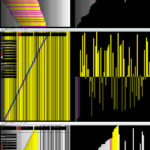
Cyan/blue – values were compared by the algorithm Magenta/red – Magenta/red – values were changed, moved or swapped. Yellow – denotes a region of focus – the values are not compared, but are being iterated. Thus yellow markers do not produce a sound. Left diagram – is a kind of piano roll view. Each new line represents a new iteration of the algorithm. Values of numbers are represented by greyscale. Right diagram – height of columns and values of numbers represent by greyscale values. Columns get sorted within the diagram.
DOWNLOAD: Win | OSX